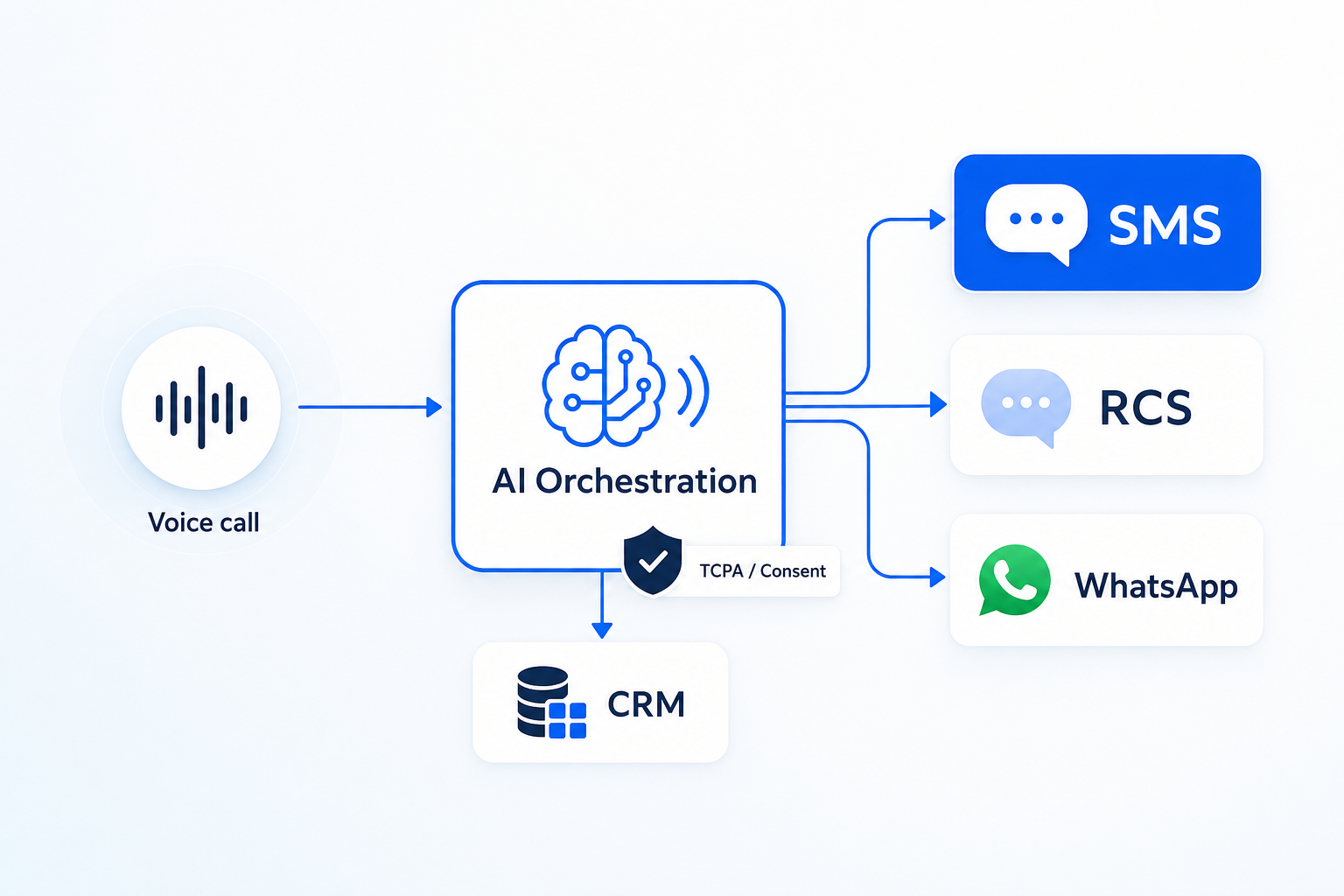
TextConvo orchestrates real-time customer conversations across SMS, email, and voice AI — compliant by default.
Body add-on sentence (in ‘business impact’ section): “With TextConvo, that context travels with the customer across SMS, RCS, WhatsApp, email, and voice AI—so ownership and next steps never reset when the channel changes.”
Body add-on sentence (in compliance/consent section): “TextConvo also centralizes consent, opt-outs, and audit trails in the same conversation timeline, helping teams adapt as regulations and carrier policies evolve.”
A unified inbox solves the most painful part of multi-channel engagement: keeping context, ownership, and next steps intact across channels. And when you pair a unified inbox with AI orchestration—the ability to make real-time decisions based on signals like intent, consent, last-touch, and SLA—you move from “managing messages” to running a system of record for customer conversations.
At TextConvo, we see this shift across industries: teams aren’t looking for “another SMS tool.” They need one place to operate conversations across SMS, RCS, WhatsApp, email, and voice AI, with guardrails for compliance and speed. That’s what a unified inbox should deliver.
Why a unified inbox is replacing the old way of managing customer conversations
The messaging industry is in a period of rapid change—new channels, rising customer expectations, and a regulatory environment that’s getting stricter. The legacy approach (one tool per channel) breaks down because it was designed for a simpler world.
Here’s what the old way typically looks like:
- Sales uses an SMS app to “speed to lead,” but marketing owns email.
- Support lives in a ticketing system that doesn’t show sales texts.
- WhatsApp is handled on individual phones or a standalone business app.
- Voice calls are recorded somewhere else, with no conversational continuity.
- Consent and opt-outs are tracked inconsistently (or not at all).
A unified inbox consolidates these interactions into a single conversation timeline—so teams can see what the customer said, what you said, what channel it happened on, and what should happen next.
The business impact: context is now a competitive advantage
When context is fragmented, your team makes avoidable mistakes:
- Asking the same qualification question twice
- Following up on the wrong channel
- Messaging a customer who already opted out
- Missing the moment of intent (e.g., the 5-minute window after an inbound lead)
A unified inbox doesn’t just make work “easier.” It reduces friction across the full journey—lead capture, qualification, scheduling, fulfillment, and retention.
The hidden costs of disconnected inboxes (and why they compound)
Most teams underestimate the operational drag of fragmented conversation management because the costs are distributed: a few minutes here, a missed follow-up there, a compliance scare once in a while.
Here are the most common compounding costs.
1) Slower speed to lead (and lower conversion)
Speed to lead isn’t a buzzword—it’s a compounding advantage. The longer it takes to reply, the more likely the prospect moves on.
In a disconnected setup, delays happen because:
- The message lands in the wrong tool
- Notifications are missed
- Ownership isn’t clear
- Hand-offs require manual forwarding
A unified inbox makes routing and ownership explicit, so first response is a process—not a heroic effort.
2) Lost conversation context (and customer trust)
Customers don’t care that your internal systems are siloed. They assume you know what they said five minutes ago—regardless of channel.
Without a unified inbox, you get:
- Conflicting answers from different team members
- Repeated requests for information
- Disjointed escalation paths (“Can you send that screenshot again?”)
Trust erodes quickly when customers feel like they’re talking to an organization that can’t keep up.
3) Unreliable compliance and consent tracking
Regulatory evolution (especially around SMS and calling) is pushing businesses to treat consent as a first-class data object. That means:
- Consent must be captured, stored, and enforceable
- Opt-outs must be honored across channels where applicable
- You need auditability: who messaged whom, when, and why
A unified inbox helps because it keeps all customer conversations—and key events like opt-in/opt-out—in one operational view. Pair that with centralized enforcement and you reduce risk.
4) Reporting that’s channel-biased (instead of journey-based)
When data is split across tools, teams measure what each tool can report—not what the business needs to know.
Examples of questions that are hard to answer without unification:
- Which conversations create qualified meetings, regardless of channel?
- Where are we dropping the ball—first response time, follow-up cadence, or scheduling?
- Which channel works best for which segment and intent?
A unified inbox is the first step to journey-level reporting because it creates a single thread of truth.
What “good” looks like: unified inbox + AI orchestration
A unified inbox is foundational. But to win in the next phase of customer communications, the inbox must be backed by orchestration—rules and AI decisioning that determine the right action in real time.
This is where the market is shifting: from bulk sending and channel management to signal-based AI and agentic AI workflows that can triage, route, and progress conversations.
Unified inbox: the human operating layer
Think of the unified inbox as your team’s cockpit:
- One conversation timeline per customer
- Channel visibility (SMS vs. WhatsApp vs. email vs. voice AI)
- Clear ownership and status
- Internal notes and handoffs
- Templates and approved language
This is where humans live when judgment matters.
AI orchestration: the decision layer
Now add an AI Decision Engine that can:
- Detect intent (pricing, scheduling, support, cancellation)
- Confirm identity or match to CRM records
- Enforce consent and universal opt-out rules
- Route by priority, language, region, or SLA
- Recommend next-best actions (or execute them)
This is what turns a unified inbox from a “view” into a system that actively improves outcomes.
If you want to see what that looks like in practice, explore our AI orchestration platform—built to run real-time customer conversations across channels, not just manage messages.
Where unified inbox + orchestration creates immediate wins
Most businesses don’t need a big transformation program to see impact. These are common high-ROI starting points:
- Inbound lead response (capture → qualify → schedule)
- Appointment and quote follow-up (reduce no-shows, close faster)
- Support triage (deflect simple issues, escalate complex ones)
- Payment and collections (reduce friction, improve completion)
- Retention saves (identify churn signals and intervene)
The key is that the unified inbox keeps context while orchestration ensures the next action is consistent and fast.
Practical checklist: how to evaluate a unified inbox (beyond the UI)
Many tools claim “unified.” In practice, they’re often just a shared view of multiple channels without the operational and compliance depth you actually need.
Use this checklist when evaluating options.
1) True conversation identity (one thread per customer)
Look for:
- Customer identity resolution (email/phone/CRM ID)
- A single timeline that merges channels into one thread
- Visibility into historical interactions and outcomes
If you can’t confidently answer “who is this?” you don’t have a unified inbox—you have a message feed.
2) Ownership, routing, and SLAs
A unified inbox should support:
- Team assignment rules (by segment, region, queue)
- Status states (new, in progress, waiting, closed)
- SLA timers and escalation
- Coverage schedules (after-hours handling)
3) Compliance guardrails that can’t be bypassed
This matters most for SMS and voice:
- Consent capture and storage
- Universal opt-out enforcement
- Quiet hours and frequency controls
- Audit trails
If an individual rep can manually message around policy, you’re carrying risk.
4) Multi-channel orchestration—not just multi-channel presence
Channel changes are real: RCS is growing, WhatsApp is essential in many markets, and voice AI is increasingly used for high-volume inbound and outbound.
Your unified inbox should be designed for multi-channel orchestration, including:
- Channel selection by customer preference and context
- Automatic fallback (e.g., RCS → SMS; email → SMS)
- Consistent templates and brand voice across channels
5) CRM integration that closes the loop
A unified inbox should not be a dead end. It should push conversation outcomes back into your systems:
- Lead status updates
- Meeting booked / no-show
- Disposition codes
- Notes and key fields captured from the conversation
When this is done well, your CRM becomes more accurate—and your reporting becomes trustworthy.
For examples of how different industries operationalize this, review these real-world use cases.
How to roll out a unified inbox without disrupting your team
Adoption fails when leaders treat a unified inbox as “just another tool.” The rollout should be tied to specific workflows and metrics.
Step 1: Pick one workflow with clear ROI
Good starting workflows:
- Responding to inbound web leads
- Appointment scheduling and confirmations
- Support triage for top 3 issues
Define success metrics upfront:
- First response time
- Lead-to-meeting rate
- No-show rate
- Time-to-resolution
Step 2: Standardize conversation states and handoffs
Before you migrate everything, decide:
- What counts as “new,” “active,” and “closed”
- When to escalate to a manager
- When to switch channels
- What information must be captured before closing
This creates consistency—especially important as you scale.
Step 3: Build message governance (templates + personalization rules)
Unified doesn’t mean generic. The best teams combine:
- Approved templates for speed and compliance
- Dynamic fields (name, location, product interest)
- Guardrails for regulated language
Step 4: Add orchestration in layers
Don’t jump straight to “AI does everything.” Start with:
- Routing rules (who should respond)
- Consent enforcement (when you’re allowed to respond)
- Intent detection (what the customer is asking)
- Recommended actions (what to do next)
- Agentic execution (auto-schedule, auto-triage, auto-follow-up)
This layered approach reduces risk and builds trust internally.
Step 5: Train for outcomes, not features
Training should focus on:
- How to keep conversations moving
- How to use context to personalize
- How to document outcomes cleanly
- When to escalate vs. resolve
Tools change. Operating principles last.
Actionable takeaways for business owners and marketers
If you’re deciding whether to invest in a unified inbox, focus on execution-ready next steps:
- Map your top 3 conversation entry points (web lead, missed call, support request) and identify where context gets lost.
- Pick one KPI tied to revenue or retention (speed to lead, booking rate, churn saves) and design the unified inbox workflow around it.
- Treat consent as a core data field, not a checkbox—centralize opt-in/opt-out tracking and enforcement.
- Design for channel evolution: SMS today, more RCS/WhatsApp tomorrow, and voice AI as volume grows.
- Adopt orchestration gradually—start with routing and guardrails, then add AI-driven next-best actions.
If you want to pressure-test your current setup and see what a unified inbox plus orchestration could look like for your business, you can contact our team.
Frequently Asked Questions
1) What is a unified inbox for customer conversations?
A unified inbox is a single workspace where your team can view and respond to customer conversations across multiple channels (like SMS, RCS, WhatsApp, email, and voice transcripts) in one continuous timeline—typically with shared ownership, routing, and reporting.
2) Is a unified inbox the same as omnichannel messaging?
Not always. Omnichannel messaging can simply mean you can send on multiple channels. A unified inbox implies operational unification: one thread of context, one ownership model, and consistent policies—plus the ability to coordinate actions across channels.
3) How does a unified inbox help with speed to lead?
It reduces response delays by ensuring inbound messages are captured in one place, routed to the right owner, and handled with consistent workflows—rather than being missed in channel-specific tools or personal devices.
4) Do I still need a CRM if I have a unified inbox?
Yes. CRMs are systems of record for customer data and pipeline stages. A unified inbox is the operating layer for conversations. The best results come from integrating them so conversation outcomes update CRM fields and stages automatically.
5) Where does AI orchestration fit in?
AI orchestration sits behind (and within) the unified inbox to make real-time decisions—like routing, intent recognition, consent enforcement, channel selection, and next-best actions. It’s how businesses move from “inbox management” to scalable, consistent customer journeys.
Conclusion: the shift from batch-and-blast to orchestrated conversations
As you evaluate vendors, treat this unified inbox for customer conversations buyer’s guide as a lens on where the messaging industry is heading—not just a feature checklist. Market shifts and regulatory evolution are reshaping what “good” looks like: consent, auditability, data residency, and retention controls now matter as much as routing and SLAs. The strongest platforms align with channel changes by letting you add new surfaces without breaking context or reporting, and they translate these practical implications into guardrails agents can rely on—so your stack stays resilient as expectations and rules keep moving.
Across the messaging industry, channel changes and regulatory evolution are forcing teams to rethink how they manage customer contact. Market shifts—like customers defaulting to WhatsApp for support, expecting SMS for urgent updates, and responding to email only for receipts—create practical implications for routing, consent, and accountability. A unified inbox for customer conversations is the operational layer that keeps context consistent as trends accelerate, while ai in customer communications helps prioritize intent, recommend next steps, and enforce guardrails in real time so teams can scale without losing trust. The old way of managing customer conversations—separate tools, siloed teams, and channel-by-channel reporting—can’t keep up with how customers actually communicate today. A unified inbox is the baseline upgrade: it preserves context, clarifies ownership, and makes multi-channel engagement operational.
But the real advantage comes when that inbox is backed by orchestration—signal-based, policy-aware decisioning that helps your team respond faster, stay compliant, and move conversations toward outcomes.
See how TextConvo can help — visit textconvo.ai to get started.
Author: TextConvo Team
🚀 See TextConvo in action
- 👉 Explore our Product
- 👉 View real Use Cases
- 👉 Contact us to get started
Tags